Sens Converter
Convert your mouse sensitivity between 105 games and keep the exact same aim everywhere you play.
I know my
Your Counter-Strike 2 sensitivity
Exact value 1.27273
- cm/360
- 40.8
- in/360
- 16.1
- eDPI
- 1018.2
- Speed
- Medium
The same aim in other games
- Fortnite5
- Apex Legends1.27
- Overwatch 24.24
- Rainbow Six Siege5
- Call of Duty: Warzone4.24
- Marvel Rivals1.6
Star a game in the list to keep it at the top. Games and DPI are remembered on this device.
How to use the sens converter
- 1
Pick both games
Choose the game you already play in “Convert from” and the game you are moving to in “Convert to”. Type a few letters to search the list.
- 2
Enter your sensitivity
Type the exact in-game sensitivity from your current game. The result updates as you type.
- 3
Check your DPI
Both sides start at 800 DPI. Enter your real mouse DPI so the cm/360 figure is right. Only change the second DPI if you use a different DPI in the new game.
- 4
Copy the result
Copy the converted sensitivity into the new game. The same physical swipe now turns you the same amount in both games.
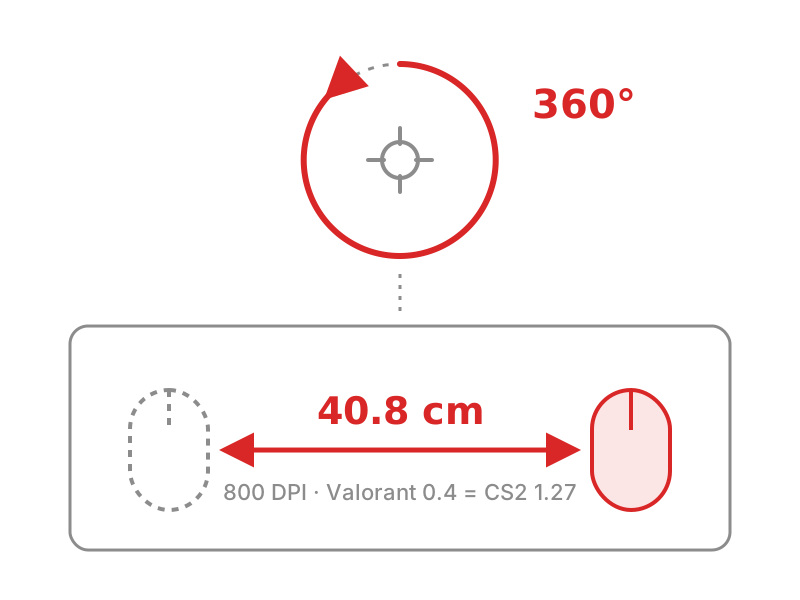
One full turn in game, measured in centimetres on your pad. That distance is what the converter keeps constant.
Sens converter guide: the same aim in every game
Switching games should not mean starting your aim from zero. A sens converter carries the muscle memory you already have into a new game by matching how far your mouse travels for each turn, not the number in the settings menu. This guide explains why the numbers differ between games, how this mouse sens converter does the math, and how to get the best result in Valorant, CS2, Fortnite, Apex Legends and the other games it supports.
Why the same sensitivity feels different in every game
A sensitivity of 1 means something different in every game. In CS2 it turns your view 0.022 degrees for each count your mouse sends. In Valorant the same 1 turns you 0.07 degrees, more than three times as far. Copy the number across and your muscle memory is gone.
What your hand actually learns is distance: how far the mouse moves across the pad to turn a certain angle. Players usually describe it as their cm/360, the centimetres needed for one full spin. Two setups with the same cm/360 feel the same when you turn and flick, whatever number each game shows. That distance is what the converter keeps constant.
How the sens converter calculates your new sensitivity
Every game turns the camera by a fixed angle, called its yaw, for each count your mouse reports at a sensitivity of 1. The converter multiplies your sensitivity by that yaw and by your mouse DPI to find how many degrees you turn per inch of movement. It then solves for the sensitivity in the new game that gives the same degrees per inch, which means exactly the same cm/360.
For games with a straight, proportional slider that comes down to new sens = old sens × old yaw ÷ new yaw. Valorant turns 0.07° per count and CS2 turns 0.022°, so a Valorant sensitivity of 0.4 becomes 0.4 × 0.07 ÷ 0.022 = 1.27 in CS2. At 800 DPI both settings need about 40.8 cm of mouse movement for a full turn.
Not every game is that simple. Minecraft, PUBG and the Battlefield series use curved or offset sliders, where doubling the number does not double the turn speed. A handful of games, including ARC Raiders and Rust, also change turn speed with field of view. The converter uses each game’s own formula and shows an FOV field where it matters, so the result stays correct across the whole slider.
Valorant sens converter: CS2, CS:GO and back
Valorant and Counter-Strike are the most common switch, and the reason many players look for a val sens converter in the first place. To go from Valorant to CS2, multiply your Valorant sens by 3.1818. Going the other way, from CS2 to Valorant, multiply by 0.3143. CS:GO uses the same scale as CS2, so a Valorant to CS:GO conversion gives exactly the same number. Many players simply call it the val to cs conversion, and the rule of thumb is easy to remember: the CS number is a little over three times the Valorant one.
The Valorant sens converter page has a full table of common values. The CS2 to Valorant sens converter and the Valorant to CS2 sens converter show each direction with ready-made rows, and players coming from the older game can use the Valorant to CS:GO sens converter.
A game sens converter for 105 games
The same method works for every supported title, and a few patterns are worth knowing. Apex Legends uses the same scale as CS2, so the number carries over one to one. Overwatch 2 and Call of Duty share a scale of their own. A Valorant value multiplied by 4 gives the same feel in Marvel Rivals. Rainbow Six Siege only accepts whole numbers from 1 to 100, so the converter tells you how far the rounded value is from a perfect match. Fortnite shows its sensitivity as a percentage, and ARC Raiders scales with your field of view.
Each game has its own page with a conversion table and notes on the settings that matter. The most used are the R6 sens converter, the Overwatch sens converter, the Fortnite sens converter, the Apex sens converter, the Marvel Rivals sens converter and the ARC Raiders sens converter. Every other game is listed in the supported games section below.
Aim trainers: an Aimlabs sens converter
Practice only pays off when the trainer feels like your game. Aimlabs lets you choose which game’s sensitivity scale it uses. If you set that scale to the game you play, type the same number you use in that game. If you keep Aimlabs on its own default scale, the Aimlabs sens converter finds the matching value. Either way, check that the cm/360 is identical and the hours you spend in the trainer carry straight over to your matches. That is all an aim sens converter has to do.
Mouse sens converter for a new DPI
Changing your mouse DPI changes your aim even inside the same game. For a proportional slider the fix is new sens = old sens × old DPI ÷ new DPI: double the DPI and halve the sensitivity. The converter handles this as well. Enter your old DPI on the left and your new DPI on the right, or open the DPI sens converter for a one-game version that also follows curved sliders.
To compare your setup with other players of the same game, eDPI (DPI multiplied by sensitivity) is the usual shorthand. Across different games, cm/360 is the number to compare.
Getting used to a converted sensitivity
The conversion matches your turn speed exactly, but a new game can still feel different at first. Field of view changes how fast the same turn looks on screen, and scoped or ADS sensitivity is usually a separate setting. Play a few sessions with the converted value and test it in a practice range or deathmatch before you change anything. If it still feels wrong after that, adjust in small steps of about 5% and keep a note of your cm/360 so you can always find your way back.
Every tool here is free, runs in your browser and needs no account. Your games and DPI are remembered on your own device, so the converter opens where you left it next time.
105 supported games
Every game has its own converter page with a ready-made sensitivity table and the settings that matter for that game.
- Valorant
- Counter-Strike 2
- Fortnite
- Apex Legends
- Overwatch 2
- Rainbow Six Siege
- Call of Duty: Warzone
- Marvel Rivals
- Roblox
- Minecraft: Java Edition
- THE FINALS
- PUBG: Battlegrounds
- 7 Days to Die
- Aimlabs
- ARC Raiders
- Arena Breakout: Infinite
- ARK: Survival Ascended
- ARK: Survival Evolved
- Arma 3
- Arma Reforger
- Assassin's Creed Black Flag Resynced
- Back 4 Blood
- Battlefield 1
- Battlefield 2042
- Battlefield 4
- Battlefield 6
- Battlefield V
- Borderlands 2
- Borderlands 3
- Call of Duty: Black Ops 4
- Call of Duty: Black Ops 6
- Call of Duty: Black Ops 7
- Call of Duty: Black Ops Cold War
- Call of Duty: Modern Warfare (2019)
- Call of Duty: Modern Warfare 4
- Call of Duty: Modern Warfare II (2022)
- Call of Duty: Modern Warfare III (2023)
- Call of Duty: Vanguard
- Chivalry 2
- Conan Exiles
- Counter-Strike 1.6
- Counter-Strike: Source
- CS:GO
- Cyberpunk 2077
- DayZ
- Deadlock
- Deep Rock Galactic
- Delta Force
- Destiny 2
- Doom Eternal
- Doom: The Dark Ages
- Dying Light 2 Stay Human
- Escape from Tarkov
- Fallout 4
- Fallout 76
- Far Cry 5
- Far Cry 6
- FragPunk
- Garry's Mod
- Grand Theft Auto V
- Gray Zone Warfare
- Half-Life 2
- Halo Infinite
- Halo: Campaign Evolved
- Halo: Reach
- Halo: The Master Chief Collection
- Hell Let Loose
- Helldivers 2
- Hitman: World of Assassination
- Hunt: Showdown 1896
- Hytale
- ICARUS
- Insurgency: Sandstorm
- Killing Floor 2
- Left 4 Dead 2
- Marathon
- Meccha Chameleon
- Naraka: Bladepoint
- Off The Grid
- Once Human
- osu!
- Palworld
- PAYDAY 2
- Quake Champions
- Ready or Not
- Rematch
- Rust
- Sea of Thieves
- Sons of the Forest
- SPLITGATE: Arena Reloaded
- Squad
- STALZONE
- Star Wars Battlefront II (2017)
- Subnautica 2
- Team Fortress 2
- The First Descendant
- The Forest
- Titanfall 2
- Tom Clancy's The Division 2
- Unturned
- Valheim
- WARDOGS
- Warframe
- Warhammer 40,000: Space Marine 2
- Windrose
Popular sens conversions
Each example uses a typical sensitivity at the same DPI in both games.
- CS2 to Valorant1.250.393
- Valorant to CS20.41.27
- Valorant to Apex Legends0.41.27
- Apex Legends to Valorant1.50.471
- Valorant to Overwatch0.44.24
- Overwatch to Valorant50.471
- Valorant to Fortnite0.45
- Fortnite to Valorant80.635
- Valorant to R60.45
- R6 to Valorant80.655
- Valorant to Marvel Rivals0.41.6
- Valorant to Minecraft0.429
- Valorant to Deadlock0.40.64
- CS2 to Apex Legends1.251.25
- Apex Legends to CS21.51.5
- CS2 to Fortnite1.255
- Fortnite to CS282.02
- CS2 to Overwatch1.254.17
What 360 distance should you use?
There is no single best sensitivity, but most players settle somewhere between 25 and 60 cm per 360. Use this scale to see where your result sits. Sensitivities are for 800 DPI.
Very low
65 cm and up
Arm aimers on large pads. Very steady crosshair, slow turns.
- Valorant
- 0.22
- CS2
- 0.69
Low
45 to 65 cm
Common in tactical shooters such as Valorant and CS2.
- Valorant
- 0.31
- CS2
- 1
Medium
30 to 45 cm
An all-round range that works in most shooters.
- Valorant
- 0.45
- CS2
- 1.44
High
20 to 30 cm
Popular in fast games with lots of tracking and movement.
- Valorant
- 0.65
- CS2
- 2.08
Very high
under 20 cm
Wrist aimers and small desks. Fast turns, less precision.
- Valorant
- 1.02
- CS2
- 3.25
More sensitivity tools
Sens converter FAQ
What is a sens converter?
A sens converter takes your mouse sensitivity in one game and works out the setting that feels identical in another. Every game uses its own scale, so the same number turns you a different amount in each one. The converter matches the physical distance your mouse travels for a full 360° turn.
How does this sens converter work?
Each game turns the camera a fixed number of degrees per mouse count at sensitivity 1. We multiply that by your sensitivity and DPI to get your 360° distance, then solve for the sensitivity in the new game that gives the same distance. For example, Valorant turns 0.07° per count and CS2 turns 0.022°, so a Valorant sens of 0.4 becomes 0.4 × 0.07 ÷ 0.022 = 1.27 in CS2.
Do I need to change my DPI when I switch games?
No. Keep the same DPI and only change the in-game sensitivity. The DPI fields are there so the cm/360 reading is correct, and for the rare case where you use a different DPI in each game.
Why does my aim still feel a little different after converting?
The conversion matches your hipfire turn speed exactly, but games differ in field of view, movement speed, recoil and how scoped sensitivity is scaled. A wider field of view makes the same turn look slower on screen. Give yourself a few sessions before changing the number.
What is cm/360?
cm/360 is how many centimetres you move the mouse to spin a full circle in game. It combines DPI and sensitivity into one real-world number, which makes it the most reliable way to compare setups between games and between players.
Is the converted sensitivity exact?
The math is exact. Some games only accept whole numbers or one decimal, so the value you can actually type may be slightly off. When that happens the converter tells you how far the rounded value is from a perfect match.
Is this sens converter free?
Yes. Every tool on SensConverters is free, runs in your browser and needs no account. Your games and DPI are only remembered on your own device.
Can I use it as a Valorant sens converter?
Yes. Pick Valorant on either side and the converter works in both directions. From Valorant to CS2 or CS:GO, multiply by 3.1818. From CS2 or CS:GO to Valorant, multiply by 0.3143. The Valorant sens converter page lists ready-made values.
Does the sens converter work with Aimlabs?
Yes, Aimlabs is one of the supported games. If your Aimlabs sensitivity scale is set to your main game, use the same number as in that game. On the default Aimlabs scale, convert as usual so the cm/360 stays the same.
Which games does the sens converter support?
105 games, including Valorant, CS2, Fortnite, Apex Legends, Overwatch 2, Rainbow Six Siege, Call of Duty, Marvel Rivals, Roblox, Minecraft and ARC Raiders. Each one has its own page with a conversion table. If a game is missing, suggest it.
Can I convert my sensitivity when I change mouse DPI?
Yes. Enter your old DPI and your new DPI in the converter, or use the DPI calculator. For a proportional slider, the new sensitivity is the old one multiplied by the old DPI and divided by the new DPI.
Do Apex Legends and CS2 use the same sensitivity?
Yes. Both turn 0.022° per mouse count at a sensitivity of 1, so the same number at the same DPI feels identical. Overwatch 2 and Call of Duty also share a scale with each other, so their numbers carry over one to one as well.
How do I use the sens converter for Marvel Rivals?
Choose your current game in “Convert from” and Marvel Rivals in “Convert to”, enter your sensitivity and DPI, then copy the result into the Rivals settings. Marvel Rivals turns 0.0175° per count, so your Valorant sens multiplied by 4 gives the same feel (0.4 becomes 1.6), and a CS2 sens is multiplied by 1.2571. The Marvel Rivals sens converter has a full table.
How do I convert my sens to Apex Legends?
Pick Apex Legends in “Convert to” and enter the sensitivity from your current game. Apex uses the same scale as CS2 and CS:GO, so from those games you keep the same number. From Valorant, multiply by 3.1818, so 0.4 becomes 1.27. From Overwatch 2 or Call of Duty, multiply by 0.3. The Apex sens converter lists common values.
How do I convert my sensitivity to CS:GO?
CS:GO and CS2 use exactly the same scale, so your CS2 sensitivity works unchanged in CS:GO, and so does an Apex Legends value. From Valorant, multiply by 3.1818. From Overwatch 2 or Call of Duty, multiply by 0.3. For any other game, select CS:GO in “Convert to”, or open the CS:GO sens converter.
Is there a sens converter for How to Fish?
Not yet. How to Fish is not one of the 105 supported games, because its look sensitivity has not been measured and checked against reference values, and we only add games we can verify. You can still match it by hand: read your cm/360 for your main game in the converter, then change the Look Sensitivity in How to Fish until a full turn takes the same mouse distance. Suggest the game and we will add it once its values are checked.
Can I convert my Valorant sens to How to Fish?
Not with an exact formula yet, since How to Fish is not in the supported list. The reliable workaround is distance: enter your Valorant sensitivity and DPI here to see your cm/360 (Valorant 0.4 at 800 DPI is about 40.8 cm), mark that distance on your mousepad, and adjust the Look Sensitivity in How to Fish until one full turn covers it.
Is there a Where Winds Meet sens converter?
Not yet. Where Winds Meet is not one of the supported games: its sensitivity has not been verified on our side, and players have reported mouse smoothing and acceleration in the game, which would make a fixed conversion inaccurate. Turn off any smoothing or acceleration option the game offers, then match your cm/360 by hand as described above. You can suggest the game so it is added once its values can be checked.